






Replace legacy engineering software when it cannot meet essential operating requirements at an acceptable cost and risk, and a feasible alternative can. The case for replacement becomes stronger when maintenance, integration and targeted modernisation cannot close the underlying gap.
For engineering companies, that judgement must also account for the calculations and project history held within the application. Replacing a platform can remove a constraint while losing the evidence behind an issued design. A sound replacement case therefore establishes both why the current system must change and what a successor must preserve.
Replacement Should Be a Business Decision, Not an Age Decision
Set legacy system replacement criteria around the required operating conditions. Can the system support approved calculation methods, controlled revisions, necessary access restrictions and recoverable project records? Can the organisation maintain those capabilities over its planning horizon?
An older application that passes these tests may remain useful. A newer one that fails a critical requirement may need replacement. Record the specific failure, its business consequence and the least disruptive credible remedy. Give any decision to retain the system a review date and an accountable owner. Dissatisfaction with the interface alone is weak evidence for replacing the underlying system.
Signs a Legacy System May No Longer Be Viable
Treat each sign as a question to investigate. The replacement trigger is a consequential gap that cannot be resolved in a sustainable way.
Business Requirements Can No Longer Be Supported
Separate missing features from structural limitations. As an illustrative example, a drainage calculation tool may overwrite input assumptions whenever a design changes. If retaining approved input versions requires reconstructing its data model, a small enhancement may be unrealistic. Replacement deserves consideration when essential engineering controls require a fundamental redesign that cannot be delivered sustainably within the existing application.
Maintenance Cost and Risk Keep Increasing
Support invoices reveal only part of the maintenance burden. Add regression testing, failed changes, incident recovery and engineers’ time reconciling workarounds to the assessment. The Software Engineering Institute explains that technical debt can arise in system architecture even where code quality is good. Repeated repairs become a replacement argument when they consume resources without restoring a credible path to required capabilities.
Integration Becomes Unreasonably Difficult
A missing API does not, by itself, settle the decision. Controlled exports or a supported adapter may suffice. Investigate replacement when essential exchanges depend on fragile screen automation, repeated manual reconciliation or inaccessible data, and a maintainable interface cannot meet required timing and accuracy. Compare the enduring interface burden with the cost and disruption of changing the source system.
Technology or Expertise Is No Longer Supportable
Confirm support arrangements for the application, database and operating environment, plus access to people who can safely change them. The NCSC’s obsolete-products guidance warns that mitigations cannot make continued use risk-free. Loss of a specialist also warrants checking whether knowledge transfer or external support can restore maintainability. A supported upgrade may resolve the underlying technical problem. Replacement becomes more compelling when no viable upgrade or support route can keep operational risk within accepted limits.
The System Blocks Strategic Initiatives
Connect the constraint to an approved initiative, such as controlled client access to engineering deliverables. Establish whether the limitation lies in the application or in unclear processes and ownership. If essential permissions cannot be represented without rebuilding the core, the system may block the initiative. Replacing software will not, by itself, resolve conflicting approval responsibilities.
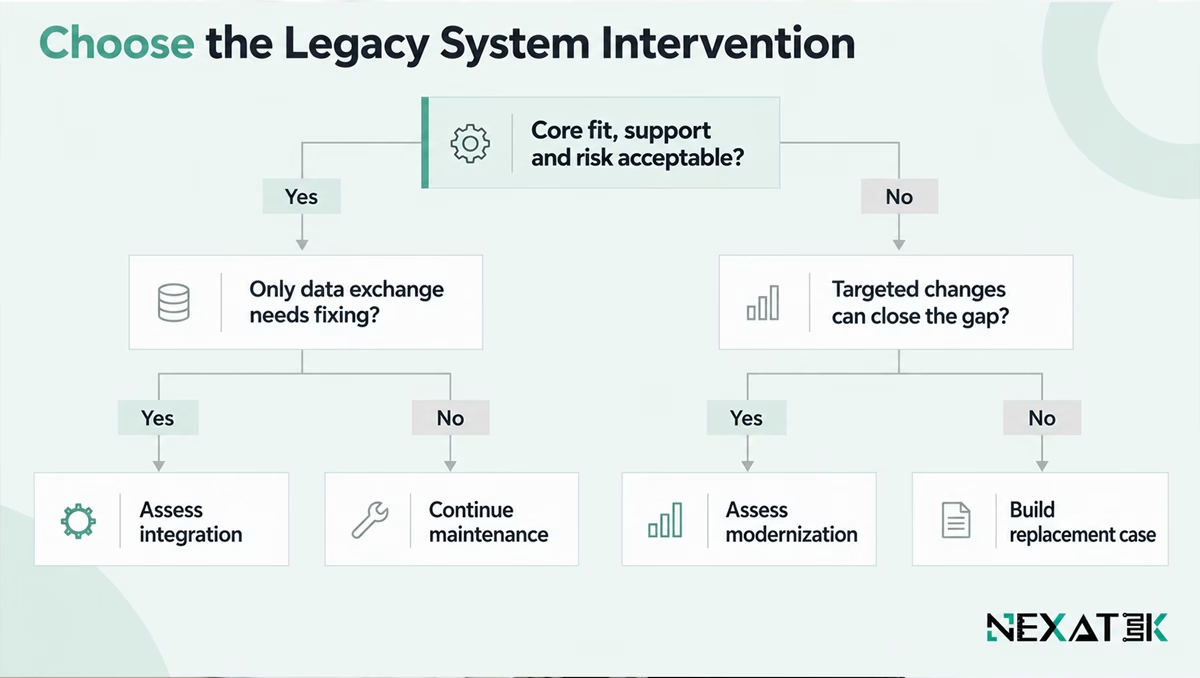
Modernize, Integrate or Replace?
For this decision, modernisation means improving the existing application while retaining its useful core. Replacement introduces a successor for the defined system or module. These are working distinctions, since broader modernisation programmes can include replacement.
| Option | Appropriate condition | Evidence required |
|---|---|---|
| Maintain | Required capabilities and support remain adequate | Acceptable operating cost, risk and recovery arrangements |
| Integrate | Core remains viable; information exchange is the gap | Maintainable interface that preserves meaning and timing |
| Modernize | Targeted changes can restore business fit or supportability | Feasible changes with acceptable lifecycle cost and risk |
| Replace | Retaining the core cannot close critical gaps sustainably | A viable successor and a controlled transition case |
Options can coexist across different modules, and integration may accompany either modernisation or replacement. Replacing a document register does not automatically justify replacing a proven calculation engine. Keep the decision boundary explicit.
Test the case for keeping the core
Bring one blocked requirement and the workaround it creates. NEXATEK can help assess the workflow, data and software constraints behind the choice.
How to Build a Replacement Business Case?
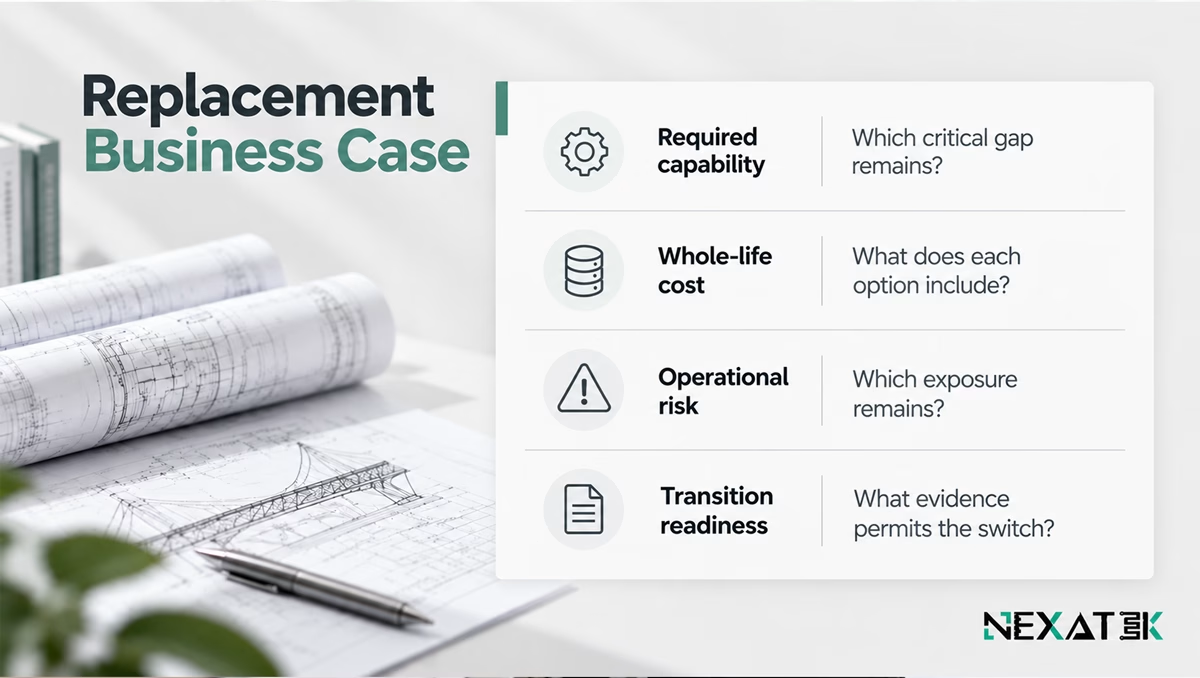
Compare engineering software replacement options against the same requirements, service expectations and planning horizon. Use four evidence tests:
- Required capability. Name each unmet requirement and show why maintenance, integration or targeted modernisation cannot resolve it acceptably.
- Whole-life cost. Include licences, support, internal engineering time and workarounds. For replacement, add data preparation, validation, training, temporary parallel operation and retirement costs.
- Operational risk. Compare continued use with transition risk. Identify credible failure scenarios, their consequences, controls and accountable owners.
- Transition readiness. Demonstrate access to data and business rules, available expertise, acceptance criteria and a workable recovery route.
A low total cost cannot compensate for failing a mandatory control. Use ranges where estimates remain uncertain. Keep difficult-to-price risks visible rather than disguising them as precise savings. Do not count the same recovered staff time twice under productivity and cost reduction.
Where proprietary engineering logic requires a tailored successor, replacing legacy engineering systems with fit-for-purpose software is one route to assess alongside suitable packaged alternatives.
What Must Be Preserved Before Replacing the System?
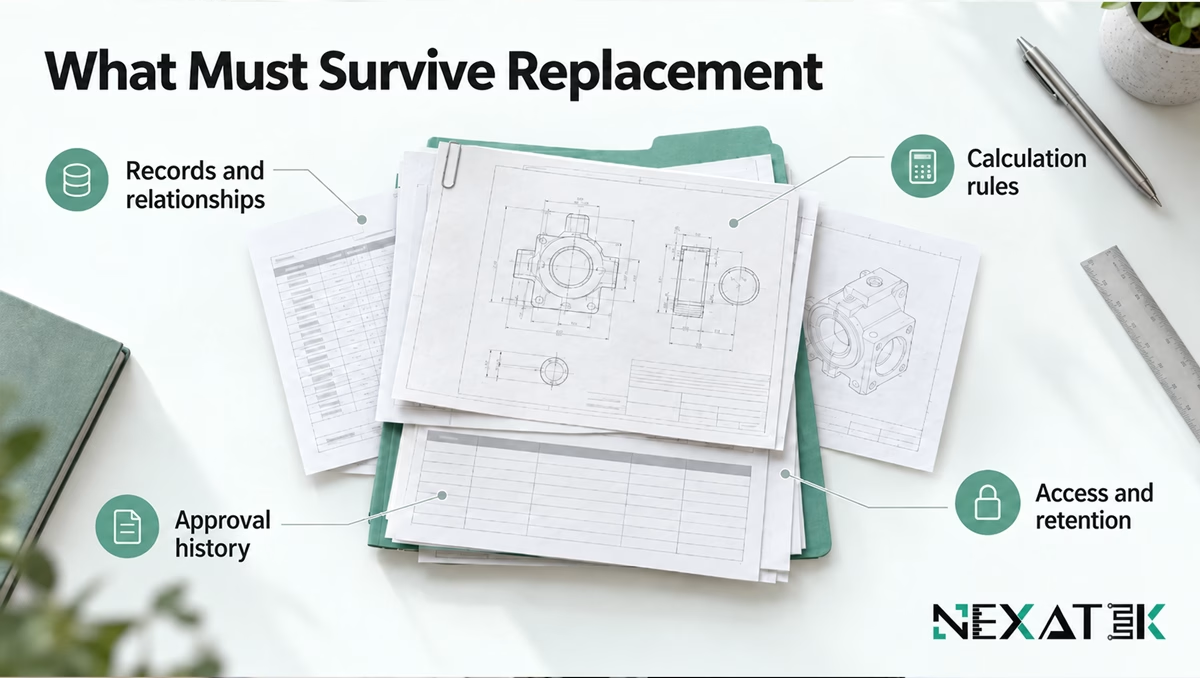
Identify what must remain usable, not simply what can be exported:
- Records and relationships: project identifiers, units, document links and the connections between inputs and outputs.
- Calculation rules: equations, assumptions, rounding behaviour, exceptions and method versions.
- Approval history: issued revisions, review decisions, responsible roles and timestamps.
- Access and retention: permissions, retrieval needs and agreed retention obligations.
Decide which records enter the successor and which remain in a controlled archive. Test retrieval and interpretation in both destinations. NEXATEK’s engineering database development covers stable identifiers, record relationships and version history that support this continuity.
NEXATEK
Keep the evidence behind issued results
A migrated result is useful only if its inputs and method remain traceable. Agree which historical decisions must be reproducible and which need a readable archive before setting the successor’s data scope.
How to Reduce Replacement Risk?
Define acceptance evidence before committing to cutover. Representative tests should cover calculations, historical-record retrieval, permissions and downstream exchanges. Where calculation methods change deliberately, document and approve the difference instead of expecting identical outputs.
The Australian Cyber Security Centre identifies incremental replacement as an option for interdependent legacy IT. Choose a boundary that can be validated independently. During parallel operation, specify which system owns live updates and how differences are reconciled. Set exit criteria so duplication does not become permanent.
If acceptance fails, pause the switch and use an approved fallback that meets minimum operating controls. Recovery must account for new records created after cutover, as well as restoring the old application.
Key Takeaways
- Replace when critical gaps cannot be closed sustainably by retaining the core.
- Compare complete costs and risks across viable options.
- Preserve engineering meaning, calculation rules and approval evidence.
- Approve replacement and authorise cutover as separate decisions.
Conclusion
A replacement decision should identify the constraint that further investment cannot reasonably resolve. It should also establish how the successor will protect engineering continuity. Approve the direction when that case is credible, then make the operational switch conditional on demonstrated readiness.
Define what the replacement must preserve
NEXATEK combines civil engineering and software expertise to shape a successor around calculation logic, project records and operational workflows.
FAQ
When should a legacy system be replaced?
A legacy system should be replaced when essential business requirements or support needs cannot be met at acceptable cost and risk through continued maintenance, integration or targeted modernisation.
Is it better to modernise or replace legacy software?
Modernise when the useful core can be retained sustainably. Replace it when its constraints prevent a viable solution and a successor can meet the requirements.
What are the risks of replacing a legacy system?
Legacy software replacement risks include lost business rules, broken record relationships, operational interruption and conflicting updates during parallel operation.
How do you justify legacy-system replacement?
Compare alternatives using the same requirements and time horizon, including whole-life cost, residual risk, preservation needs and transition readiness.



Old doesn’t always mean outdated!
Good point!
Exactly, Ryan! Age alone isn’t a good reason to replace a system. The real question is whether it still supports the team’s workflows, integrations, and future needs. That’s usually where custom software development becomes relevant when the existing system starts creating real limitations. What do you think is the clearest sign that a legacy system has reached that point?