

Custom Mobile App Development for Civil Engineering
NEXATEK develops mobile applications for iOS and Android that automize design, reporting and data recording, work offline, and synchronize records back to office systems.
Field Workflows and Site Operations

Design and Calculation

Offline Data Capture and Synchronization

Field Data Collection and Site Records

Inspection, Reporting, and Checklists

Drawings, Plans, and Technical Data Access
Similar Projects
Discover more innovative projects:



Great
Solutions
Start With A ConversationGreat Solutions Start With A Conversation
Want to Explore How Our Services Can Grow Your Company?
Custom Mobile App Development for Civil Engineering
Custom mobile app development for civil engineering closes a specific gap: most engineering data is created on site, while most engineering systems live in the office. A compaction test result written on paper at 10:00 often reaches the project database two days later. By then, the next layer is already placed. Mobile apps designed around field workflows capture that result once, at the source, and synchronize it with the office.
Generic tools assume stable connectivity and large screens, two conditions a live construction site rarely offers. The sections below define what custom development means in an engineering context and show where these tools fit within a wider Digital Transformation in Civil Engineering effort. NEXATEK approaches this work from the civil engineering side first and the software side second.
 Field-ready mobile apps capture engineering records directly where the work happens.
What Is Custom Mobile App Development in Civil Engineering?
Custom mobile app development in civil engineering means designing the application around an engineering workflow instead of adapting the workflow to an off-the-shelf product. The starting point is a concrete artifact: a piling record, a concrete pour card, a daily site diary. Each screen of the app then mirrors that artifact.
Structure carries more weight than feature count. A site inspection app, for example, presents the checklist for the current hold point, attaches photos with position and timestamp, then routes the record for engineer sign-off. Approval flows and user roles follow the project hierarchy that already exists on paper.
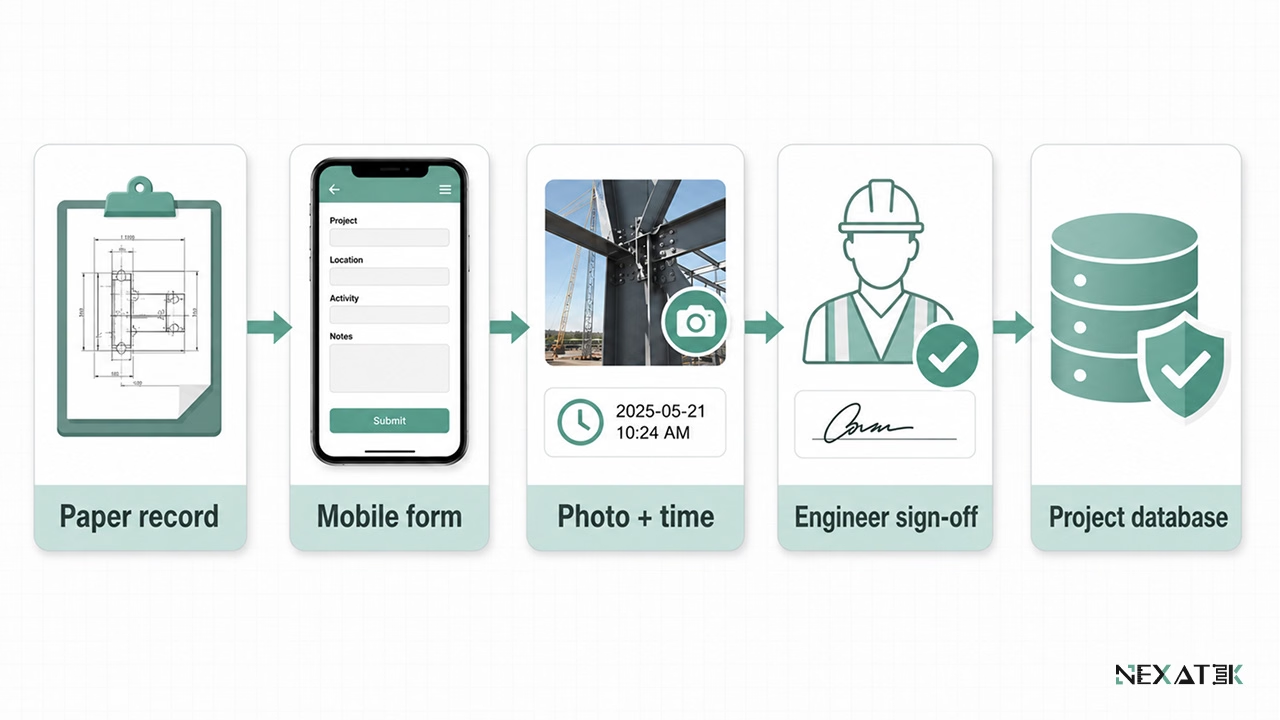 A useful field app mirrors the engineering record first, then adds structure, validation, and approval routing.
Site conditions shape the technical design as well. Engineers work in dust and glare, often with gloves on. Interfaces need large touch targets and forms that close in under two minutes. Connectivity is treated as intermittent by default, which separates these tools from consumer apps built for constant coverage.
Why Civil Engineering Requires Custom Mobile Applications?
An office decision is only as good as the field record behind it. Quantity claims, progress payments, non-conformance reports, and as-built records all trace back to what someone observed on site.
Field-Based Engineering and Site Operations
Most project data originates at the work front. Inspectors document conditions, supervisors confirm quantities, and engineers resolve clashes during execution. Paper forms and scattered chat messages add delay and transcription errors at every handover.
A structured mobile form changes the failure mode. Required fields cannot be skipped, units are fixed, and every entry carries an author, a timestamp, a position, and a photo reference. A rebar spacing entered as 150 mm stays 150 mm; no one later misreads a handwritten digit.
Single entry at the source also removes duplicate work. After synchronization, the office works with the original record instead of retyping it, which cuts one full administrative step from the daily reporting cycle.
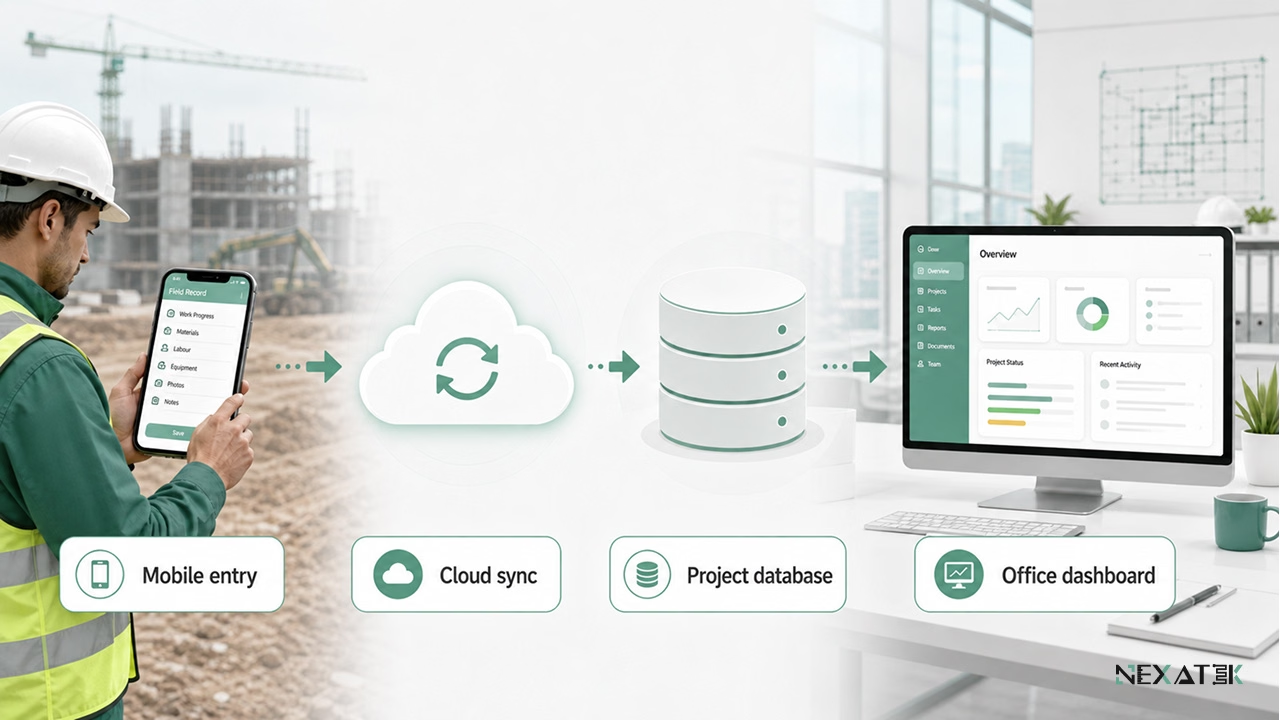
Single entry at the source turns site observations into structured office records without retyping.
Limitations of Desktop-Only and Generic Mobile Tools
Desktop software assumes a stable network and a quiet desk. Reporting in a desktop-only setup therefore waits until the engineer returns to the site office, often hours after the observation was made. Details fade in that gap.
Generic mobile tools create a different problem: desktop menus shrunk onto a six-inch screen. Logging one observation can take eight taps through nested menus. Forms carry fields no one on the project uses, while a needed field, such as a mix design reference, has no place at all.
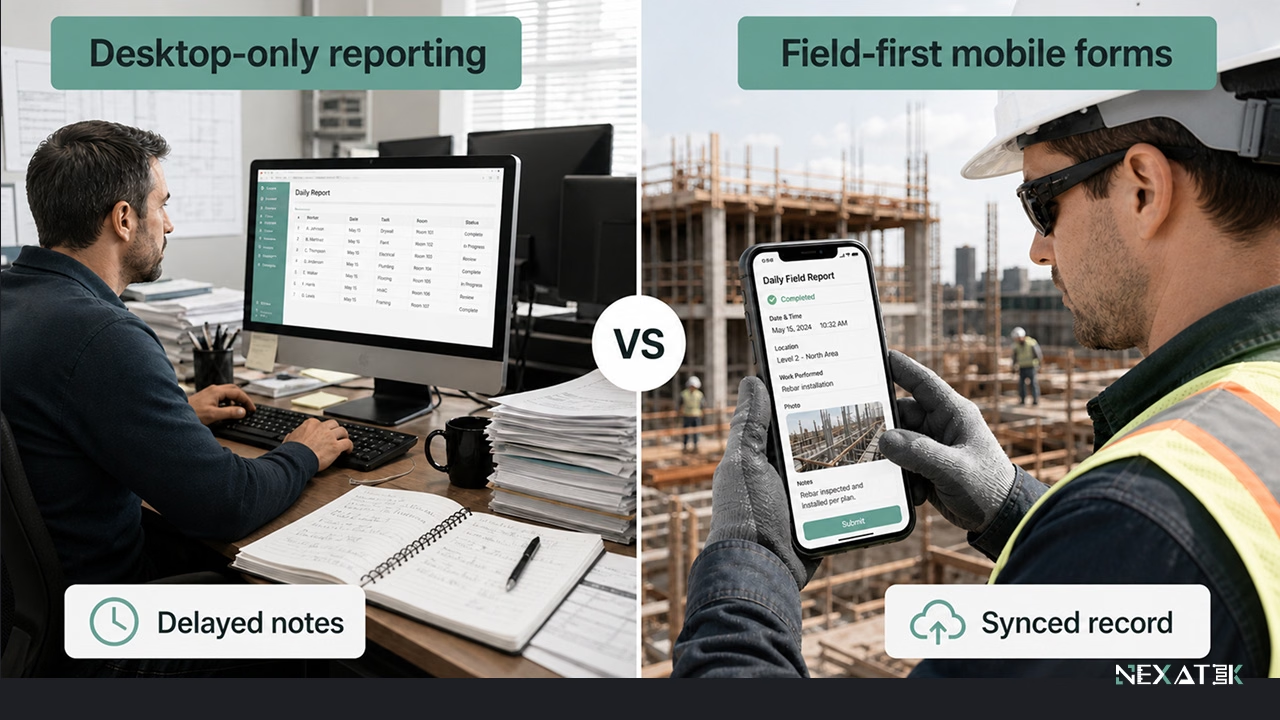 Field-first forms reduce reporting delay by capturing the observation before details are lost.
Core Functions of Civil Engineering Mobile Apps
Four functions cover most of the field demand on engineering projects. Each one replaces a manual routine that currently ties up site staff.
Field Data Collection and Site Records
Field data collection applications capture observations at the source: test values, material conditions, weather, and work status. Photos attach automatically with position and time, so a failed compaction test documents itself.
Consistency across crews is the second gain. When every team uses the same form, monthly quantities aggregate without manual cleanup, and the accumulated entries become a searchable project history.
Inspection, Reporting, and Checklists
Checklists turn site inspections into repeatable procedures. The app presents each criterion in sequence, blocks completion until mandatory items are answered, and stores the result against the relevant structure or chainage.
Report generation follows directly from the completed checklist. An inspection closed at 14:30 on site can reach the project manager as a formatted report the same afternoon rather than as a scanned form two days later.
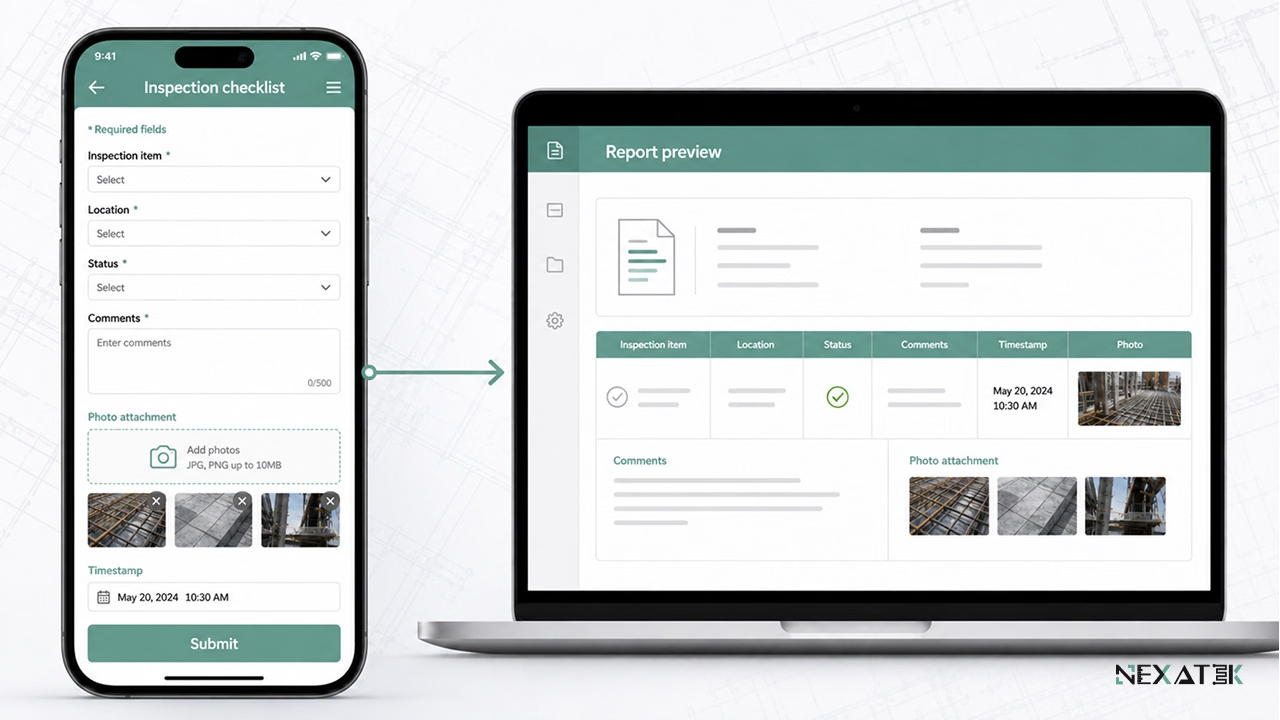 Mobile checklists connect inspection answers, photos, timestamps, and report output in one structured record.
Access to Drawings, Plans, and Technical Data
Building from a superseded drawing is one of the most expensive site errors. Mobile document access lowers that risk by serving only the current approved revision, with older versions visible but clearly marked.
Permissions stay with the office. Site users view drawings and method statements, while changes remain controlled through the existing document workflow.
Communication Between Site and Office
Messages tied to records beat messages in a general chat group. When a query about a pile cap links directly to its inspection record and photos, the responding engineer sees the full context at once.
Office teams follow the same threads through browser-based engineering tools, so a technical query raised on site and its answer stay in one place.
Custom Mobile Apps vs. Generic Construction Apps
Feature lists make generic construction apps look complete on paper. The useful comparison for custom mobile app development for civil engineering is alignment: how closely the data model matches the way a project measures and reports its work.
Constraints of One-Size-Fits-All Mobile Tools
One-size-fits-all tools serve a broad market, so their forms adapt only within fixed templates. A team that needs to log substrate moisture before a membrane installation often has nowhere to put the value.
Terminology mismatches follow. When the data model lacks the project's naming for structural elements and test types, crews compensate with free-text fields and side spreadsheets. Data quality then drops in the structured records, exactly where the project needs it most.
Benefits of Mobile Apps Built for Engineering Workflows
Purpose-built apps start from the project's own artifacts: its inspection forms, its quantity sheets, its test regimes, and its naming conventions. Field entries land in central project databases in the structure the office already uses, without repeated transformation.
Change is the other advantage. When a client requires a new report format or a project adds a test regime, the app follows the requirement instead of forcing a workaround.
[Insert Photo 06: Custom Mobile App Data Model Connected to Project Systems]
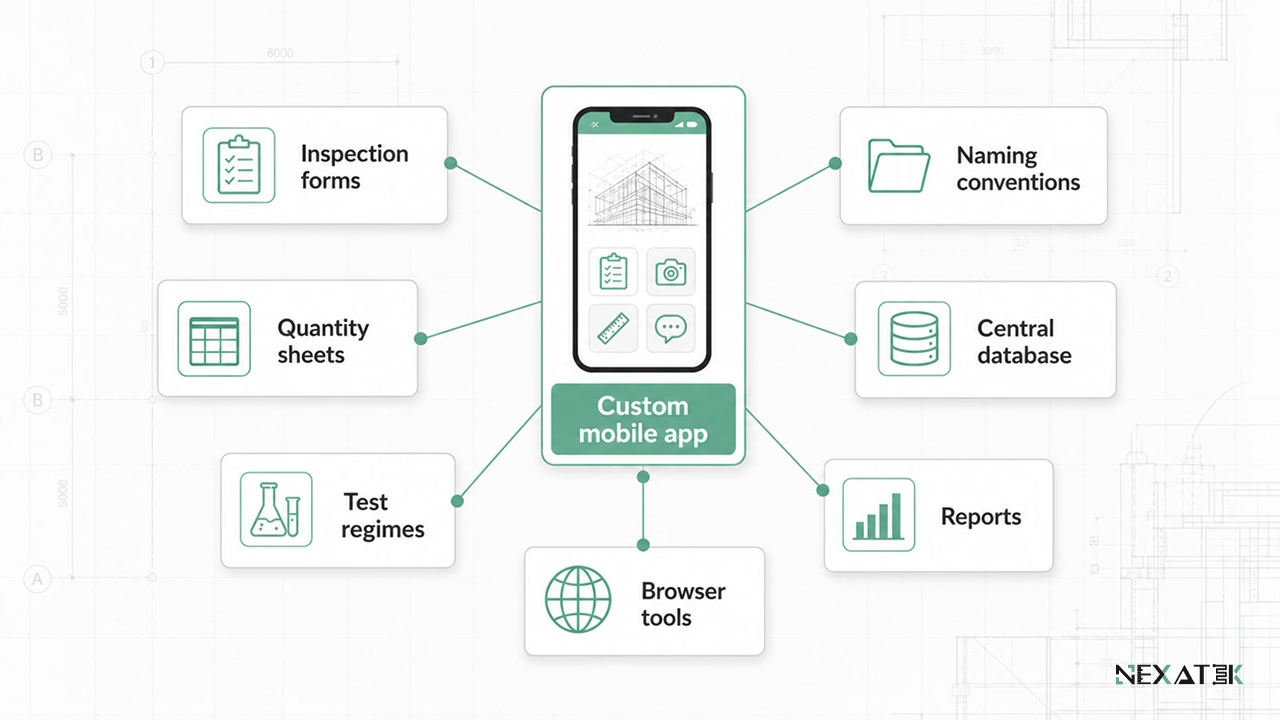 Custom mobile apps keep field data aligned with the project’s own forms, names, reports, and databases.
Mobile App Design Considerations for Engineering Projects
Design choices made before development decide whether an engineering field app is adopted or abandoned on site. Three constraints dominate the outcome.
Offline Operation and Data Synchronization
Connectivity fails at the worst moments, inside tunnels and in deep basements. Offline engineering applications treat the network as optional: every entry is stored locally first. Synchronization runs whenever a connection appears, uploading queued records to the cloud platform and pulling document updates back down.
Conflicts need explicit rules. If two inspectors edit the same record while offline, a custom cloud-based app flags the collision and preserves both versions instead of silently overwriting one.
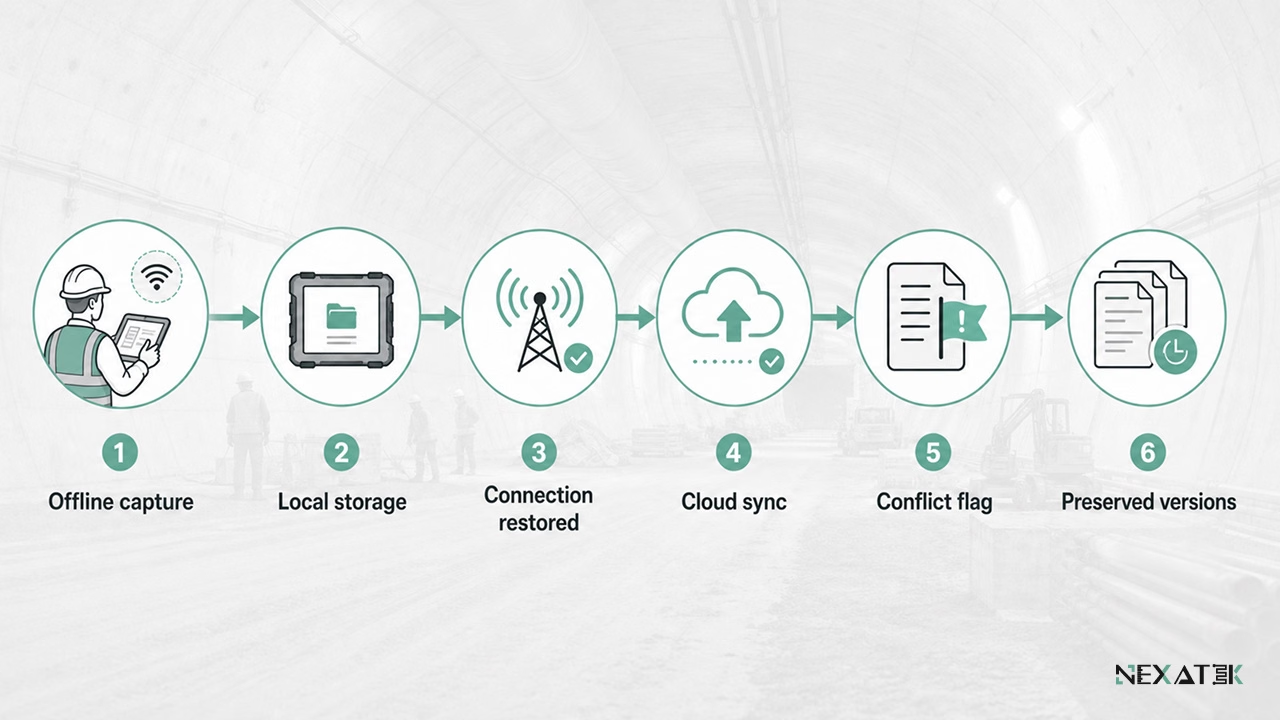 Offline-first design protects site records when connectivity is weak or unavailable.
Usability for Engineers and Site Staff
Site teams range from graduate engineers to foremen with limited digital experience. An app survives that range when each screen does one job and validation catches errors at the moment of entry.
Training effort is a practical test. A form that mirrors the existing paper checklist is usually learned in one toolbox talk. New abstractions take weeks and invite workarounds.
Data Accuracy and Version Consistency
Accuracy starts at input. Mandatory fields, fixed units, enforced sequences, and plausibility checks stop most recording errors before they exist. A slump value entered as 700 mm triggers a warning instead of passing into the record unnoticed.
Version control protects the record afterwards. Every edit keeps its history, and every drawing carries its revision, so the team can reconstruct who recorded what and when, months after handover.
Use Cases Across Civil Engineering Organizations
Field-first apps look different depending on who runs them. The three patterns below recur across the civil engineering organizations NEXATEK works with.
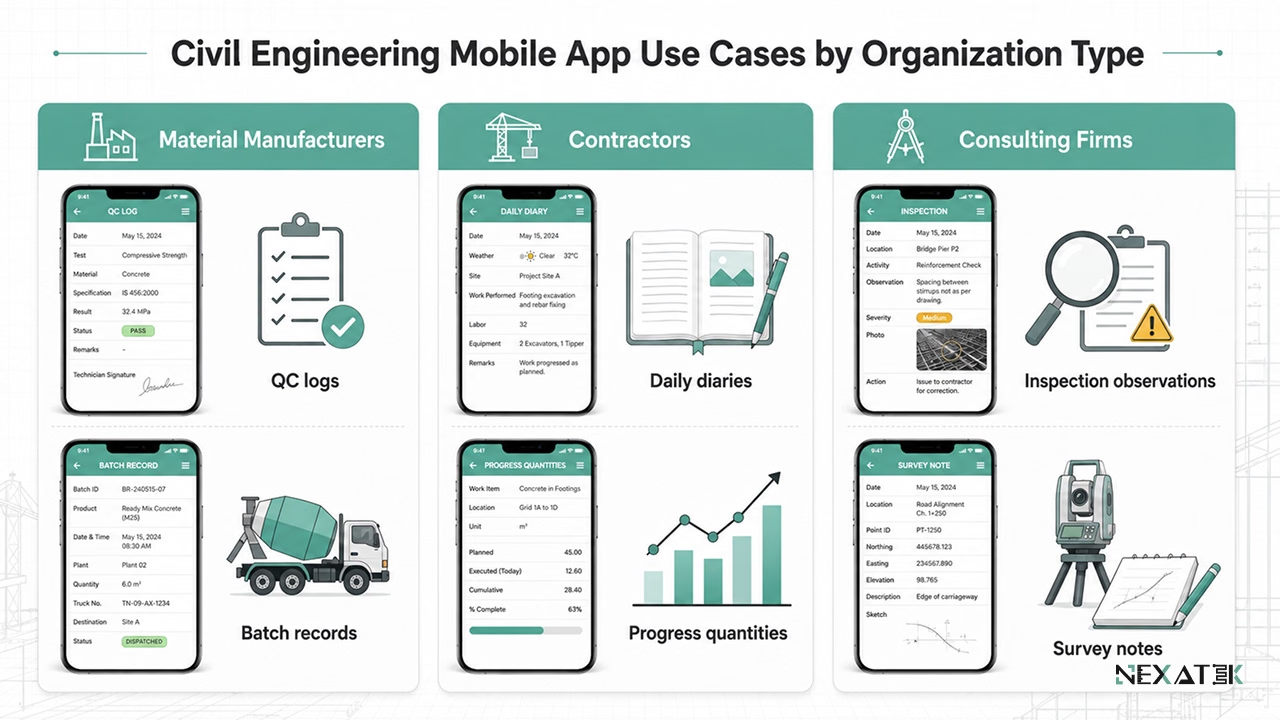 Different civil engineering teams use mobile apps for different field records, but each case depends on structured capture at the source.
Material Manufacturers and On-Site Quality Control
Material manufacturers depend on installation feedback to stand behind their products. A mobile quality control app records substrate temperature, batch numbers, application conditions, and deviations during installation, so technical support responds to data rather than recollections.
Production lines gain from the same approach. Inside the plant, mobile workflow digitization covers batching logs and pre-dispatch quality checks, often as one part of a wider workflow automation program.
Construction and Infrastructure Contractors
Contractors coordinate several crews and subcontractors across active sites. Daily diaries, progress quantities, issue logs, and subcontractor records captured on mobile devices synchronize into the Enterprise Systems in Civil Engineering the head office already runs.
Supervisors recover time at the end of each shift. A daily record assembled from entries made during the day replaces the 45-minute evening write-up.
Engineering and Consulting Firms
Engineering and consulting firms split their week between site visits and analysis. Structured capture during an inspection or survey shortens the reporting tail, because observations arrive sorted and photo-referenced, ready for the assessment report.
NEXATEK builds these applications by pairing civil engineers with software developers, so the data model matches site practice from the first prototype onward.