







Engineering software integration challenges rarely begin with a missing connector. They begin when two systems disagree about what a record means, which version is current, who is allowed to change it, or when an update becomes valid. In engineering companies, those disagreements can affect drawings, laboratory results, calculation inputs, approvals, project controls, and site records. The practical goal of engineering software integration is therefore not simply to connect applications. It is to preserve engineering meaning while data moves between specialist tools and enterprise systems.
Why Software Integration Is Difficult in Engineering Companies
Engineering organisations operate across software categories that were designed for different purposes. Structural analysis tools, BIM platforms, GIS systems, laboratory applications, spreadsheets, document repositories, field apps, ERP platforms, and internal databases may all describe the same project from different viewpoints.
That makes software interoperability a data and workflow problem as much as a technical one. A project number may be free text in one system and a controlled identifier in another. A laboratory application may store results by specimen while a project database expects them by work package and location. APIs do not remove these semantic differences.
Open standards help where a domain supports them. buildingSMART describes IFC as an open international standard for sharing structured built-environment data across software platforms. Standards reduce translation effort, but project-specific attributes, revisions, and business rules still need explicit decisions.
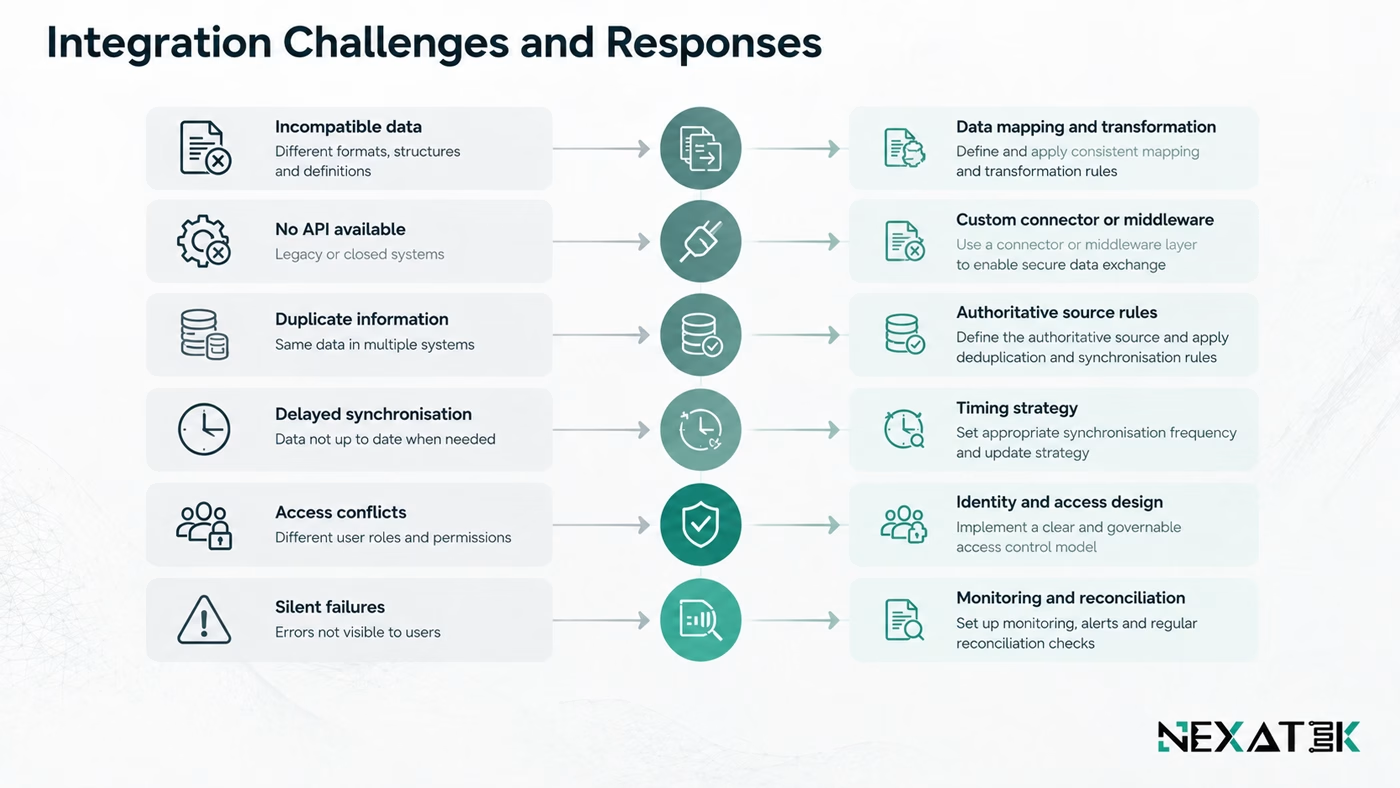
Common Engineering Software Integration Challenges
| Integration challenge | Typical cause | Practical response |
|---|---|---|
| Incompatible data | Different schemas, units, identifiers, or object structures | Mapping and transformation rules |
| No usable API | Legacy or closed specialist software | Custom connector, file adapter, or middleware |
| Duplicate records | Independent databases and unclear ownership | Master-data and authoritative-source rules |
| Delayed synchronisation | Batch exports or manual transfers | Event-driven or scheduled integration with explicit timing rules |
| Access conflicts | Different permission models | Central identity design and least-privilege access |
| Silent failures | Weak validation or monitoring | Reconciliation checks, logs, alerts, and retry rules |
Incompatible Data Formats and Data Models
File format is only the visible layer. The harder issue is schema meaning. One system may store chainage as text, another as a numeric station value, and a third may attach location to a GIS coordinate. A successful integration needs explicit mapping for identifiers, units, field definitions, null values, status codes, and revision rules.
Engineering data integration therefore exposes weaknesses that were hidden while systems operated separately. The interface forces a decision about whether two records are actually equivalent.
Legacy Systems Without Modern APIs
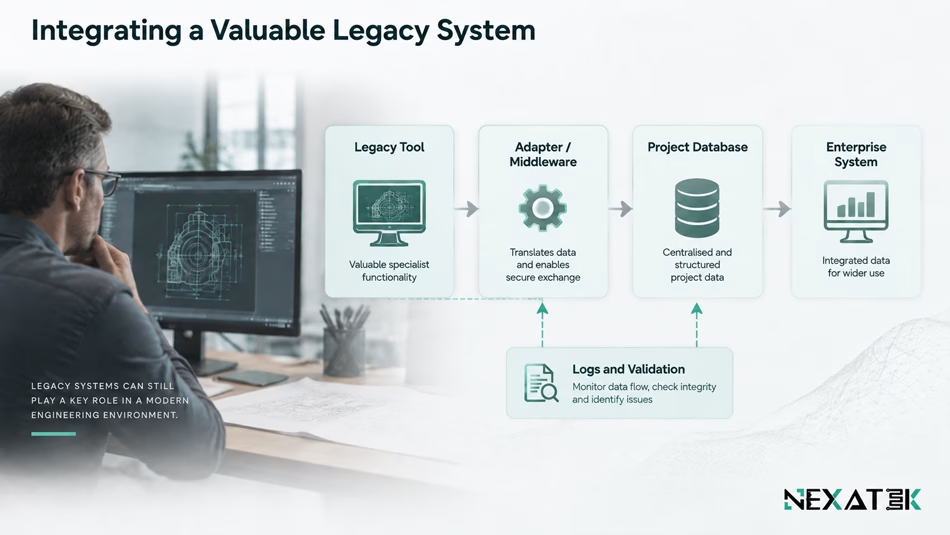
Some specialist engineering applications remain valuable because they contain proven calculation logic or long project histories. Replacing them only to gain connectivity can be disproportionate.
Legacy system integration may use controlled file exchange, scheduled exports, database views, desktop automation, or a custom adapter. The choice should reflect update frequency, data sensitivity, supportability, and failure risk. A brittle workaround is a poor foundation for a live approval workflow.
Data Silos and Duplicate Information
Two systems can be technically connected and still disagree every morning. The usual cause is duplicate ownership. If both the ERP and project database can edit supplier names, contract references, or project codes, integration becomes continuous conflict resolution.
A stronger model designates an authoritative source for each shared record and limits which systems may change it. NEXATEK’s engineering data infrastructure approach emphasises stable identifiers, controlled entry, version history, and integration with existing tools.
NEXATEK
Define ownership before connectivity
An integration can move data perfectly and still create operational confusion if nobody owns the authoritative record. Before building interfaces, define which system is allowed to create, correct, approve, and retire each critical engineering data object.
Complex Engineering Workflows and Business Rules
Engineering workflows are rarely one-way transfers. A design result may require checking, approval, revision, and downstream notification. A field observation can trigger a nonconformance, design review, and revised drawing. Integration logic must preserve those dependencies.
This is where generic point-to-point connections often become difficult to maintain. If every system contains its own partial copy of the business rule, one process change requires several code changes. The integration layer should carry only the orchestration it genuinely owns, while engineering rules remain in the system responsible for them.
Security, Access and System Ownership
An integration creates a new path to engineering information, so permissions must cover the full data flow. Access to an issued drawing should not automatically expose internal calculations or commercial data through a connected system.
NIST SP 800-207 frames access around users, assets, and resources rather than implicit trust based on network location. For engineering integration, that principle supports role-based access, service authentication, controlled credentials, audit logs, and clear separation between read, write, approve, and administer permissions.
Approaches to Engineering Software Integration
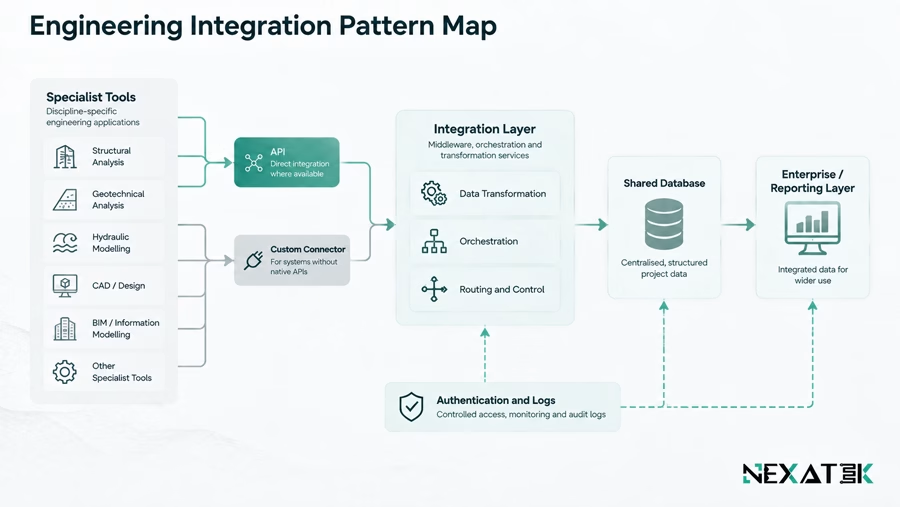
There is no single best integration pattern. The useful question is which pattern gives the required reliability without creating unnecessary coupling.
APIs and Custom Connectors
APIs are usually the cleanest option when both systems expose stable interfaces and the required objects are available. They support direct validation, controlled permissions, and near real-time exchange.
A custom connector becomes useful when the available API does not represent the engineering workflow well, or when one system exposes data through proprietary files, a database interface, or a limited export function. NEXATEK’s custom software for engineering workflows includes integration of existing tools and legacy systems where standard connectivity is not sufficient.
Middleware and Integration Layers
Middleware creates a controlled layer between systems. Instead of building ten direct connections, each application can communicate through a shared integration service that handles routing, transformation, logging, retries, and common authentication.
This pattern suits environments where several systems share project data or interfaces change over time. Middleware should simplify relationships, not become an opaque store of undocumented business logic.
Map the integration boundary before choosing the technology
Review which engineering records must move, which system owns them, and what should happen when an exchange fails before committing to an API, middleware, or database approach.
Review your engineering integration scope
Explore integrated digital solutions for engineering companies
Shared Databases and Data Pipelines
A shared database can work when several applications need the same structured record and ownership is clear. It is less suitable when applications control their own internal schemas, because direct writes can bypass validation and create upgrade risks.
Data pipelines suit analytics, reporting, migration, or synchronisation where transformation is expected. ETL or ELT can standardise identifiers, units, and fields before information reaches a reporting layer. Timing must still match the operational need. A nightly pipeline may suit monthly reporting but not a live site approval status.
How to Plan an Integration Project?
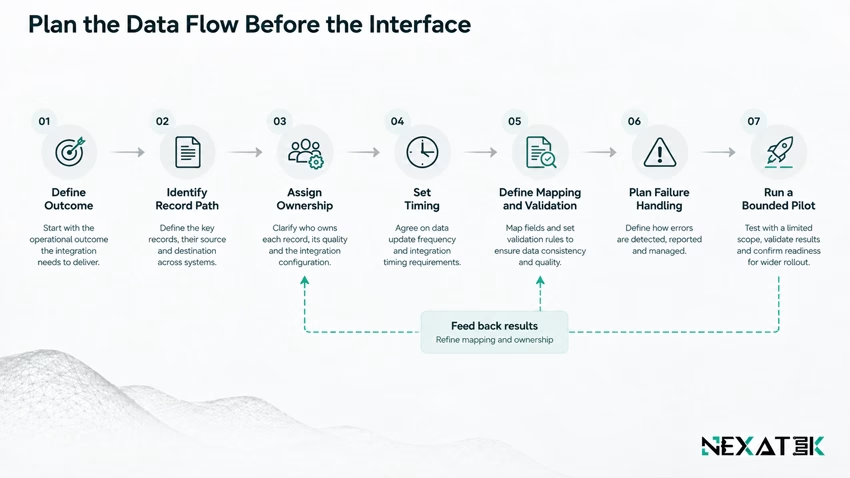
Start with one engineering workflow, not a list of applications. The planning sequence should make the information path visible before technology is selected.
- Define the operational outcome. State what should become faster, safer, more traceable, or less repetitive.
- Follow one record end to end. Identify where it is created, checked, changed, approved, consumed, and archived.
- Assign data ownership. Name the authoritative system and correction owner for each shared object.
- Classify exchange timing. Decide whether updates must be immediate, event-driven, scheduled, or manual by exception.
- Specify mapping and validation. Document identifiers, units, mandatory fields, status transitions, and rejection rules.
- Design failure handling. Define retries, alerts, reconciliation, rollback, and what users should see when data does not move.
- Pilot a bounded interface. Prove one measurable workflow before expanding the integration surface.
This sequence prevents a common mistake: automating duplicate work before deciding what should disappear. Automating connected engineering workflows should follow the redesigned handoff rather than reproduce the manual one.
How to Validate Integration Reliability?
One successful test record does not prove reliability. Validation must cover data correctness, workflow behaviour, security, and recovery.
Test normal cases and engineering edge cases. Check missing values, duplicate identifiers, rejected approvals, changed units, late updates, offline records, and revised data arriving out of sequence. Confirm that the receiving system can distinguish a new record from an update and a superseded record from an active one.
Operational monitoring matters after launch. Use message logs, failed-transfer queues, retries, reconciliation reports, and stale-data alerts. For high-value records, scheduled source-to-destination checks can expose silent mapping failures.
Reliability also has a human test. Engineers should know where a value came from, which system owns it, when it changed, and what happens if the interface is unavailable. If those answers are unclear, the integration is not fully governed.
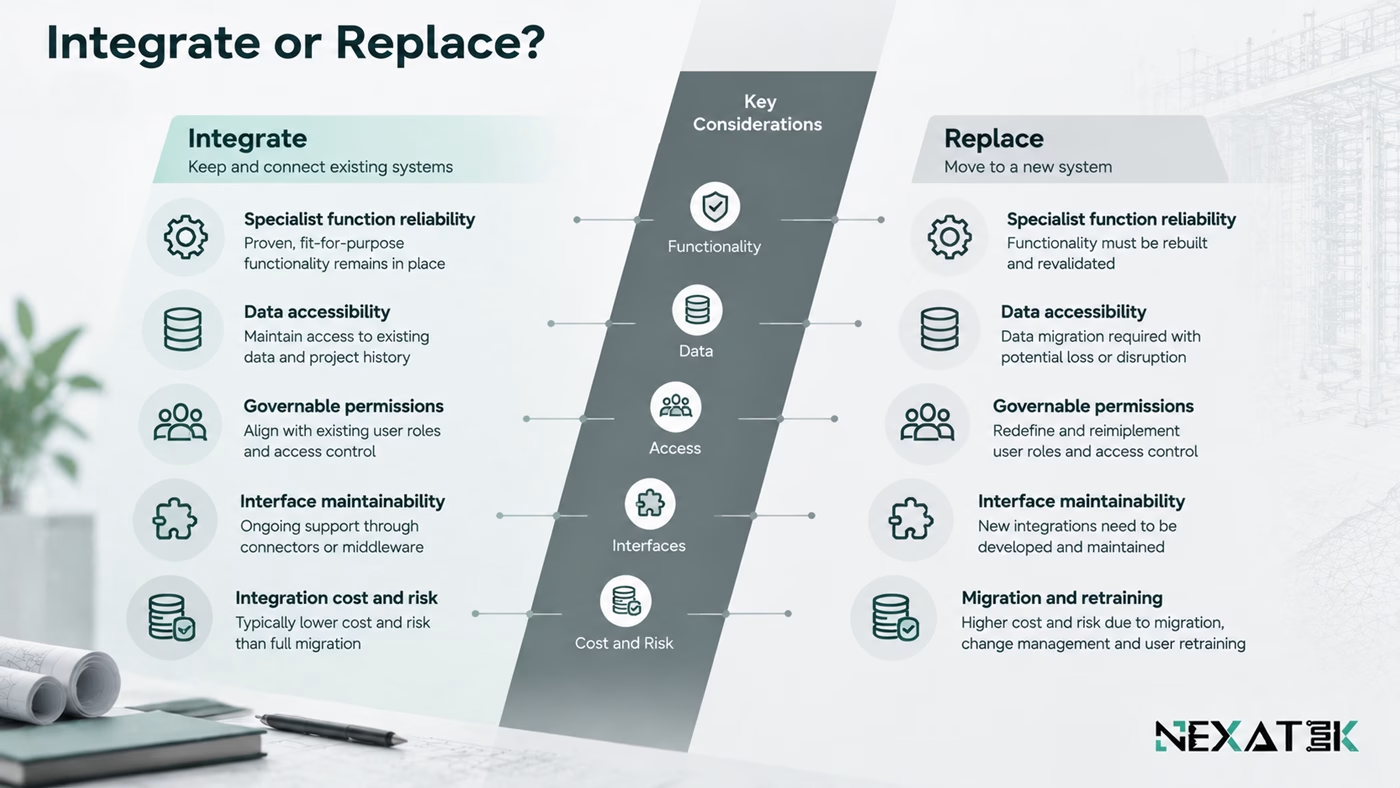
When Integration Is Better Than Replacing a System
Integration is usually stronger when an existing application still performs its specialist task well and only the surrounding data exchange is weak. Replacement becomes more sensible when the tool is unsupported, difficult to secure, incompatible with required workflows, or costly to integrate safely.
A practical decision can be made against five questions:
- Does the system still perform a critical engineering function reliably?
- Can its data be accessed without unsafe workarounds?
- Can ownership and permissions be governed?
- Is the integration interface maintainable through software upgrades?
- Is the cost of connecting and supporting it lower than migration and retraining?
The answer is often mixed. A company may retain specialist calculation software, replace an obsolete database, and connect both through integrated digital solutions for engineering companies. Integration and replacement can coexist when the system boundary is chosen carefully.
Key Takeaways
- Engineering software integration challenges usually come from mismatched meaning, ownership, timing, and workflow rules, not from connectivity alone.
- APIs are useful when systems expose stable interfaces, while connectors or middleware can bridge legacy and multi-system environments.
- One authoritative source should exist for each critical shared record.
- Synchronisation rules must match operational timing, from real-time approvals to scheduled reporting.
- Reliability testing should include edge cases, monitoring, reconciliation, and failure recovery.
- Integration is often preferable to replacement when a specialist system remains technically valuable and can be governed safely.
Conclusion
Good engineering system integration reduces translation work without weakening traceability. The design task is to decide what should move, what remains authoritative, how exchanges are validated, and how failures become visible.
That discipline changes the investment question. Instead of asking whether two applications can be connected, ask whether the resulting data flow can be trusted during design changes, site pressure, approvals, audits, and future software upgrades. When the answer is yes, integration becomes part of the engineering operating model rather than another interface to maintain.
Turn disconnected engineering systems into a controlled data flow
NEXATEK can help define the data ownership, interface logic, validation rules, and workflow boundaries needed to connect engineering tools without losing traceability or creating another layer of manual reconciliation.
Frequently Asked Questions
Can legacy engineering software be integrated through APIs?
Sometimes. If a legacy system has no suitable API, integration may use controlled file exchange, database views, middleware, or a custom connector instead.
Should engineering companies integrate or replace legacy systems?
Integrate when the specialist system remains reliable and its data can be governed safely. Replace it when support, security, accessibility, or maintenance risk makes long-term integration impractical.
How do you prevent data inconsistencies between integrated systems?
Define an authoritative source for each shared record, use stable identifiers, validate mappings, control update permissions, and run reconciliation checks after synchronisation.



This really nails the hard part of integration!
Thanks, Lora! Exactly. Connecting the systems is often the easy part—the real challenge is keeping data, workflows, and responsibilities consistent across different tools. That’s also where custom software development can help when standard integrations don’t fully match the engineering workflow. Which part of integration do you find most challenging?
One of the biggest challenges in engineering software integration is not connectivity, but making sure every system interprets and updates the same data consistently. Clear data ownership and validation rules can save a lot of reconciliation work later.
Exactly, Mohammad Hossein. Once the systems are connected, data consistency often becomes the real challenge. Clear ownership and validation rules are also a big part of custom database development, especially when multiple engineering tools depend on the same data.