





Construction management software connects planning, cost control, documents, field reporting, procurement, and project communication in one managed environment. For contractors and engineering firms, its value is not the number of features on a licence sheet. The real test is whether information moves reliably from the tender estimate to the programme, site record, payment application, and final handover.
This guide covers capabilities, components, benefits, deployment choices, selection criteria, and the point where custom development becomes justified.
What is construction management software?
Construction management software is a digital system used to plan, coordinate, record, and control construction projects across their lifecycle. It creates a shared operational layer for project teams, replacing disconnected spreadsheets, email chains, paper forms, and isolated applications with structured workflows and traceable records.
Core Functions and Capabilities Explained
A complete system combines scheduling, cost, documents, field reporting, procurement, quality, safety, and workforce data. Strong platforms connect related records rather than only storing them. A delayed submittal can affect a programme activity, a change instruction can update the cost forecast, and a failed inspection can trigger corrective actions with clear ownership.
Specialist engineering tools remain necessary, so the platform may exchange data with BIM, ERP, accounting, GIS, IoT, digital-twin, and dashboard systems. IFC under ISO 16739-1 supports model exchange, while reliable integration still needs clean data and agreed ownership.
NEXATEK Perspective
A platform becomes useful when it reflects the project’s decision paths. Start with the information that teams create, approve, revise, and reuse; then select or build the software around that flow.
Types of Construction Management Solutions (Cloud vs. On-Premise)
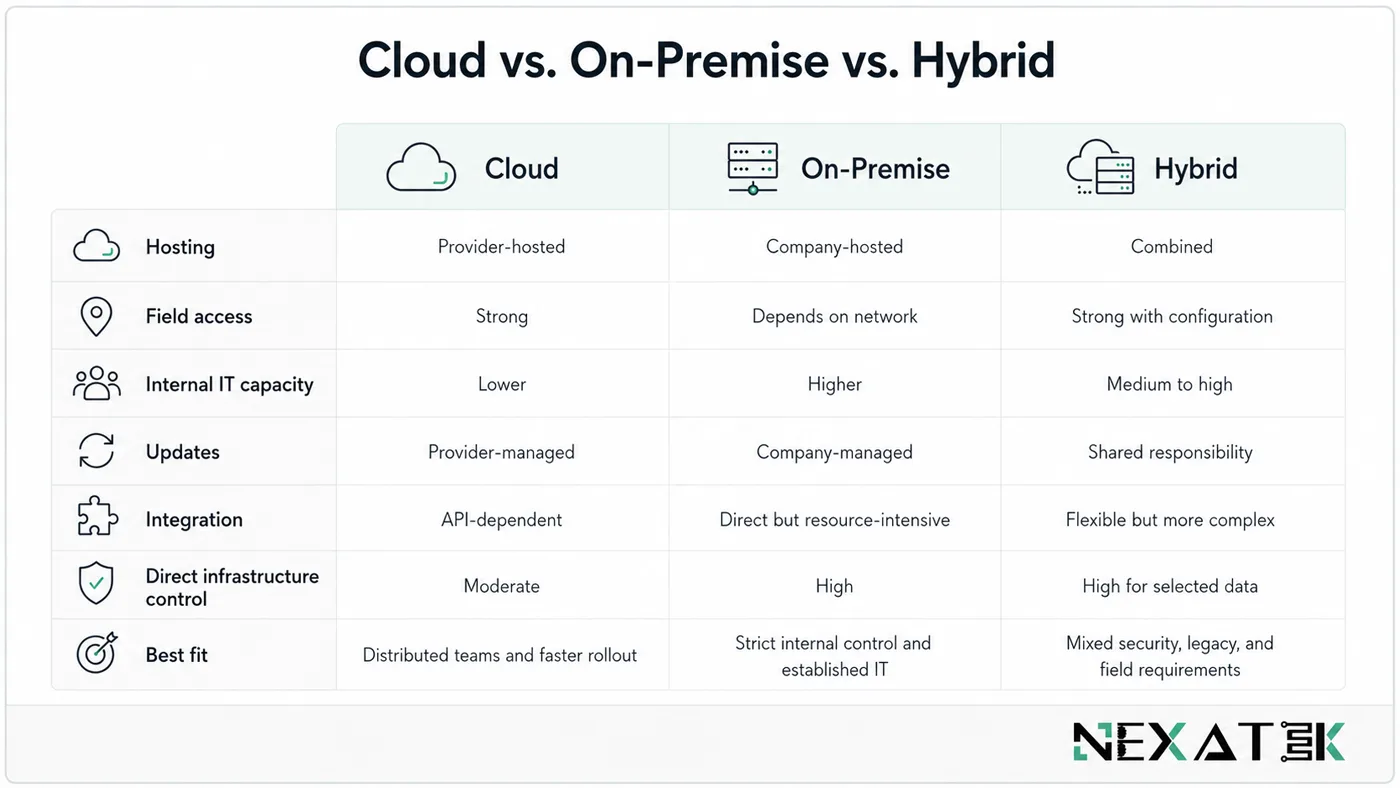
Cloud platforms are provider-hosted, accessible from distributed sites, and generally faster to deploy. Updates and infrastructure are managed centrally, but integration depth and data-residency options depend on the vendor. On-premise systems give an organisation direct infrastructure control and may suit strict internal policies, although they require stronger IT capacity, maintenance, backups, and upgrade planning.
Hybrid deployment keeps selected sensitive or legacy data on company infrastructure while field collaboration and other services run in the cloud. Choose through security, connectivity, integration, support capacity, and lifecycle cost-not assumptions.
Key Features of Construction Management Software
Project Scheduling & Tracking
Scheduling modules organise activities, dependencies, milestones, resources, and baseline dates. Useful systems connect the programme to actual field progress rather than relying on a weekly manual update. Managers can then compare planned and completed quantities, identify critical delays, and assess the downstream effect of late design information or approvals.
Cost Management & Estimating
Cost functions cover estimates, budgets, commitments, variations, forecasts, payment applications, and cash-flow views. Their value depends on linkage: a change should move from technical instruction to cost review and approval without repeated entry. Estimating data should also remain available after award, so the project team can compare tender assumptions with actual production and procurement.
Document Control & Communication
Document control manages numbering, metadata, revisions, issue status, approvals, and access. This is particularly important where ISO 19650-aligned information management is required. The ISO 19650 series addresses the exchange, recording, versioning, and organisation of information for buildings and civil engineering works.
Older procurement documents may still refer to BIM Level 2 or Level 3, but ISO 19650 does not use the “BIM Level 2” notation. Communication should stay attached to the relevant drawing, RFI, submittal, inspection, or change; general chat is a weak project record.
Field Productivity
Field tools capture daily reports, inspections, quantities, photographs, equipment hours, issues, and non-conformances at the source. Offline capability is essential for tunnels, basements, remote infrastructure, and sites with unstable connectivity. Structured forms, fixed units, required fields, and timestamps improve data quality while reducing office re-entry.
Bid Management
Bid management supports opportunity qualification, tender documents, subcontractor invitations, clarifications, comparison, and final estimate approval. A controlled process preserves pricing assumptions and transfers them into the awarded project budget and procurement plan.
Map the workflow before comparing products
Document how one tender, drawing revision, site issue, and cost change moves through your organisation. This exposes the integrations and controls that a product demonstration may overlook.
Essential Components of Construction Management Software
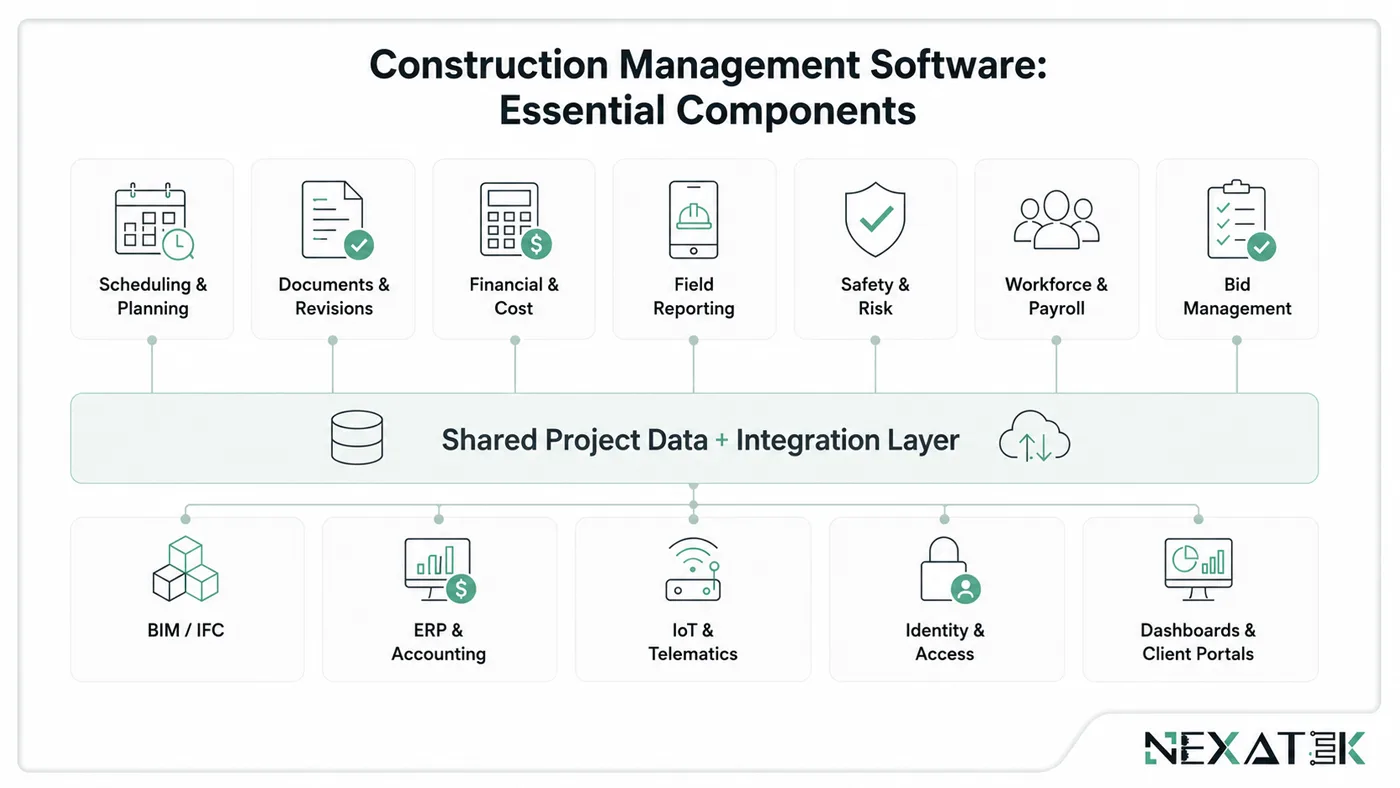
Features describe capabilities; components provide the operational structure that makes them dependable across projects.
Project Scheduling & Planning
The planning component should support baselines, dependencies, work breakdown structures, look-ahead planning, progress measurement, and change history. It should also distinguish an approved programme from a working forecast. Integration with field quantities and cost codes prevents schedule reporting from becoming a separate administrative exercise.
Document Management & Control
A reliable document environment needs metadata, revision history, workflow status, transmittals, permissions, and searchable links to project records. A drawing should connect to the calculation, review comments, approval, and work package it supports. This creates traceability without forcing users to reconstruct context from folder names.
Financial & Cost Management
Financial control requires one cost-code structure across estimate, budget, commitments, actuals, changes, and forecast. Permissions and approval thresholds should reflect the organisation’s governance. ERP integration must avoid duplicate sources of truth: the construction platform may manage commitments while finance remains the ledger of record.
Field Productivity & Reporting
The field component needs mobile forms, offline capture, drawing access, issue workflows, and automatic report generation. Data entered once should feed daily reports, progress dashboards, quality records, and handover documentation. Adoption depends on speed: a site form that takes ten minutes to complete will be bypassed, regardless of its technical completeness.
Safety & Risk Management
Safety modules manage observations, permits, inspections, incidents, corrective actions, and risk registers. The data should support leading indicators, not only incident totals. ISO 19650-6:2025 extends the information-management approach to collaboratively classifying, sharing, and delivering structured health and safety information across asset lifecycles.
Human Capital Management & Payroll
This component connects workers, roles, qualifications, timesheets, attendance, leave, and payroll inputs. Construction-specific requirements may include trade, crew, site allocation, certification expiry, union rules, allowances, and overtime. Integration should reduce repeated entry while respecting local payroll, labour, tax, and privacy requirements.
Human Capital Management & Payroll
A second operational view is workforce capacity. Managers need to compare planned labour demand with available skills across active projects. The same records support mobilisation, competency checks, utilisation, and payroll preparation, with role-based access for sensitive personnel and pay data.
Engineering Consideration
Do not force every function into one application. A stable architecture may use specialist planning, finance, BIM, or payroll tools while a shared data layer and defined interfaces keep project records consistent.
The Benefits of Construction Management Software
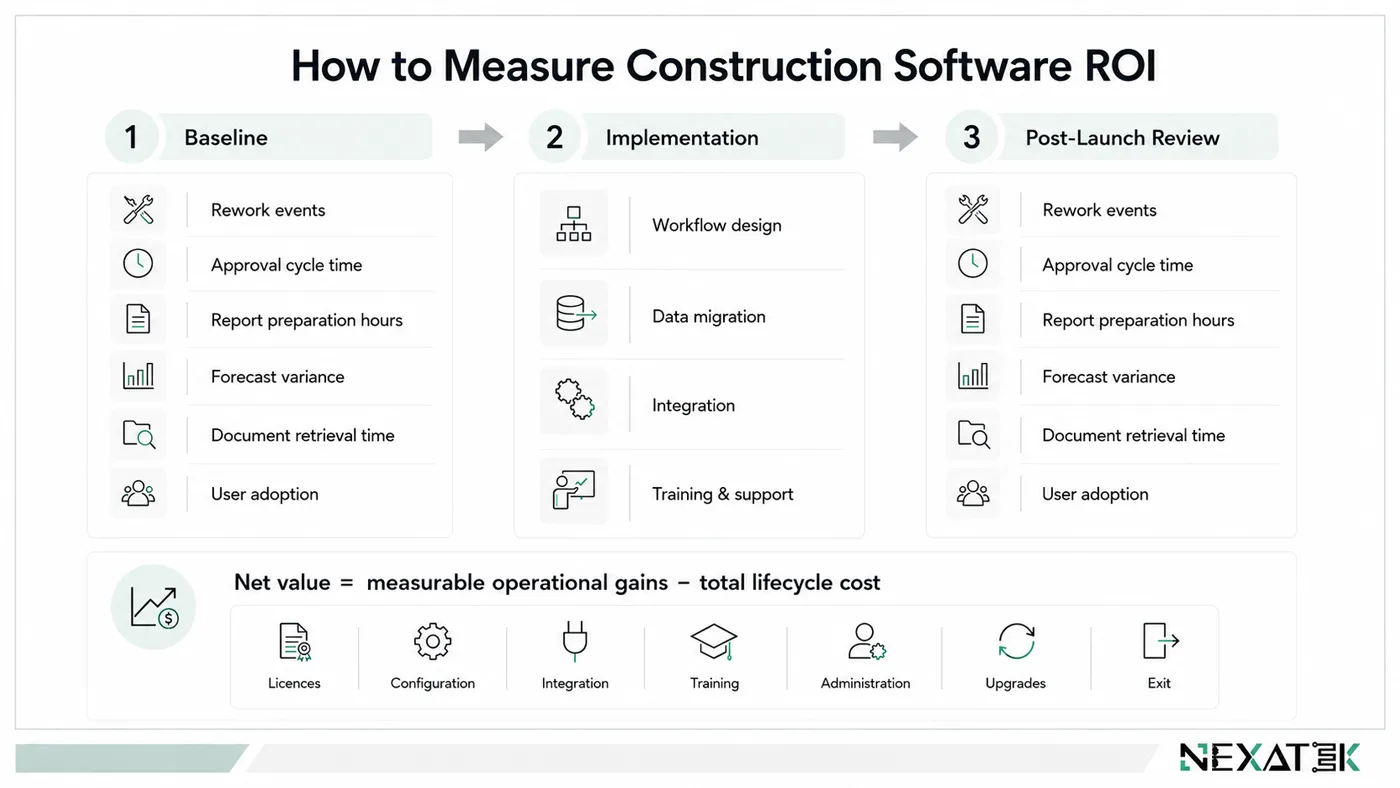
Benefits appear when teams change workflows, not simply buy licences. Set baselines before implementation: RFI time, rework, reporting hours, forecast variance, approval delay, and retrieval time.
Reduced Rework
Current drawings, structured reviews, clash coordination, and field validation reduce preventable errors. In an Autodesk customer story, contractor PT PP reported approximately 20–25% improved accuracy and 10–20% lower material waste after adopting connected construction workflows. These are vendor-reported results from one organisation, not universal benchmarks, but they show the type of outcome that should be measured.
Cost Savings
Savings can come from less duplicate entry, faster approvals, better procurement visibility, and earlier detection of cost movement. A credible ROI model should include implementation, integration, configuration, data migration, training, support, and internal administration—not only subscription fees.
Increased Efficiency
Connected records shorten the path between observation and decision. A failed inspection can trigger an NCR, notify the responsible engineer, update the dashboard, and remain linked to evidence. A 2023 Autodesk University business-case presentation reported a potential 20% saving in pre-construction time and £264,000 saved through pilot projects; again, organisations should validate such gains against their own workflows.
Reduce Risk
Traceability reduces uncertainty during claims, audits, handover, and technical review. Role-based access, approval history, backups, security controls, and defined retention rules strengthen governance. Software cannot remove project risk, but it can expose responsibilities, open decisions, and information gaps earlier.
Maximize Profits
Profit improves when margin leakage becomes visible. Strong cost forecasting connects commitments, actuals, production, changes, and remaining work. Managers can then act on adverse trends before month-end reporting confirms them. The goal is a faster, more reliable forecast-to-action cycle—not a more attractive dashboard.
Why not develop your own software solution?
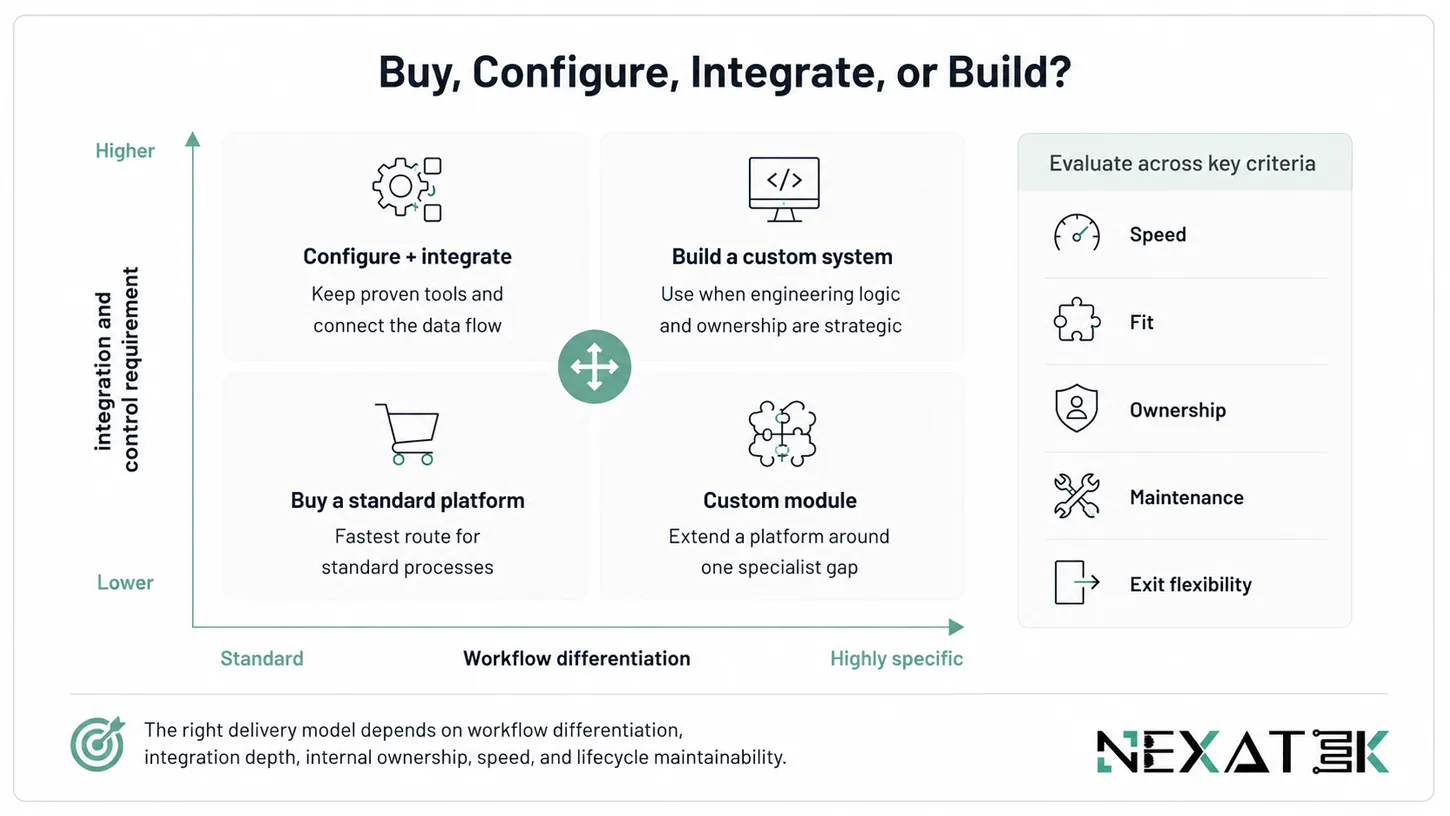
You should consider custom development when the organisation’s engineering logic, approvals, data relationships, or integrations cannot be represented safely in a standard platform. Custom software can support proprietary calculations, product-specific methods, specialised field records, client portals, and long-term control over the roadmap.
Development is not automatically better. It requires process ownership, governance, testing, cybersecurity, support, and maintenance. A practical approach is often composable: retain proven commercial tools for standard functions and build custom modules or integrations around the gaps. NEXATEK’s custom software development for civil engineering follows this engineering-first model.
Decision Note
Build where the workflow creates competitive or technical value. Buy where the process is standard, well-supported, and unlikely to differentiate the organisation.
How do I find a suitable construction management software?
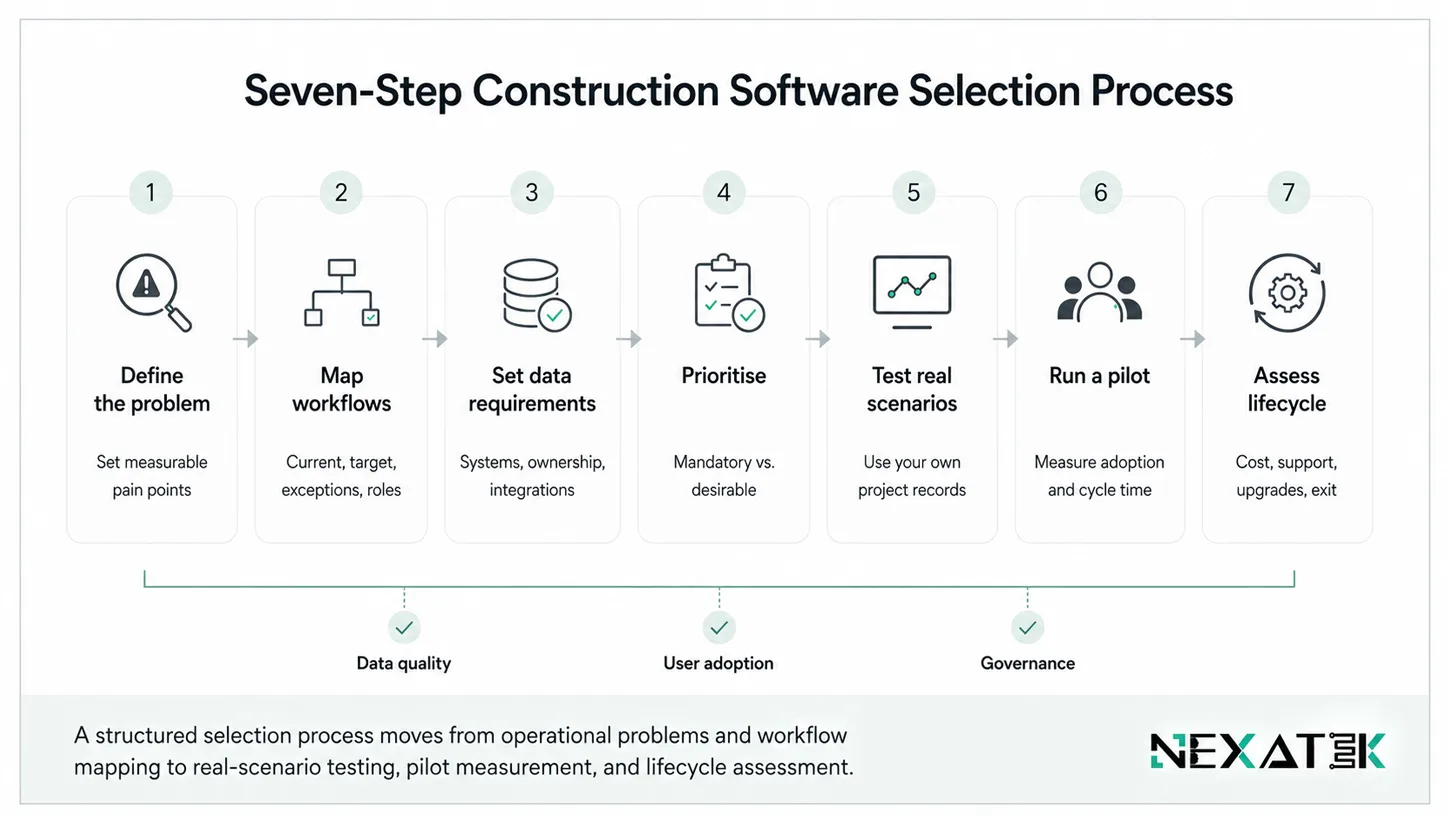
Use a structured selection process rather than starting with vendor demonstrations:
- Define the operational problem. Identify measurable pain points and the decisions the system must support.
- Map current and target workflows. Include exceptions, approvals, roles, and handovers between office and field teams.
- Set data and integration requirements. List existing ERP, accounting, BIM, document, database, and identity systems.
- Prioritise requirements. Separate mandatory controls from desirable features.
- Test real scenarios. Use your own drawing revision, RFI, change, inspection, and payment workflows in demonstrations.
- Run a controlled pilot. Measure adoption, data quality, cycle time, and support demand on one representative project.
- Assess lifecycle cost and ownership. Include migration, configuration, licences, integrations, training, administration, upgrades, and exit options.
Before shortlisting, decide how data can be exported and who owns configured workflows and project records. A platform that is easy to enter but difficult to leave creates long-term commercial and operational risk. NEXATEK’s workflow automation and process optimisation services can help define this target state before product selection.
What kinds of Contractors should use Construction Management Software?
General contractors benefit from coordination across planning, commercial, design, procurement, quality, safety, and subcontractors. Specialist contractors benefit when their work produces repeated technical records, inspections, calculations, or submittals. Civil and infrastructure contractors need strong mobile, offline, location, asset, and long-lifecycle document capabilities. Small contractors may start with focused cloud tools, while larger groups often need portfolio reporting, integrations, and enterprise governance.
Company size is not decisive. Software becomes worthwhile when fragmentation, repeated entry, delayed approval, and weak traceability cost more than a controlled digital process.
💡 Key Takeaways
The most important points to remember when evaluating construction management software:
Construction management software should connect project records and decisions rather than simply storing files.
Cloud, on-premise, and hybrid solutions each fit different security, integration, connectivity, and support needs.
Scheduling, cost, documents, field reporting, safety, procurement, and workforce information should work together within the same project data model.
ISO 19650 is today’s reference for information management. Older BIM Level 2/3 terminology should not be considered current ISO terminology.
Evaluate improvements in cycle time, rework, reporting effort, forecast accuracy, and user adoption.
Custom development is ideal for unique engineering workflows, while standard business functions are usually better handled by proven commercial software.
Conclusion
The best construction management software is not the product with the longest feature list. It is the system that fits the organisation’s project controls, engineering information, field conditions, governance, and capacity to maintain change. Selection should begin with workflows and data, continue through scenario-based testing, and end with a measured pilot.
For some organisations, a configurable cloud platform will be sufficient. Others need a hybrid architecture, custom integrations, or purpose-built modules. In each case, the objective remains the same: create a reliable information flow from bid to design, construction, commercial control, and handover.
Turn fragmented project processes into a practical digital roadmap
NEXATEK combines civil-engineering knowledge with software, data, UX,
and workflow expertise to assess current operations and define the right
balance of standard platforms, integration, and custom development.
Frequently Asked Questions
How does construction management software improve project profitability?
Construction management software helps improve profitability by reducing costly rework, preventing delays, and giving project teams better control over budgets, schedules, documents, and resources. With one connected source of truth for office and field teams, managers can catch problems earlier, make faster decisions, and keep projects moving with less waste. Over time, that translates into tighter cost control and healthier margins.
What key features should I look for in construction management software?
The best construction management software should make it easier to manage schedules, RFIs, submittals, documents, costs, and daily field activity in one place. Strong reporting, mobile access, and resource tracking are also important because they help teams stay aligned across the office and the job site. If your projects involve digital design workflows, BIM integration is another key feature to look for.
Can construction management software integrate with BIM and other digital tools?
Yes. Modern construction management platforms are designed to work with BIM and other digital tools so teams can collaborate more effectively across design, planning, and execution. This kind of integration helps improve coordination, reduce clashes, and keep project information connected from one phase to the next. For complex projects, that connection can make a major difference in both speed and accuracy.
What is the best software for construction management?
There is no single best construction management software for every company. The right choice depends on the size of your projects, the way your teams work, and how much you rely on BIM, scheduling, or field collaboration. Some platforms are stronger for project control and jobsite coordination, while others are better suited for BIM-driven workflows or enterprise-level planning. The best option is the one that matches your operational needs and supports your long-term growth.
Which AI is best for construction management?
The most useful AI for construction management is the one that works with real project data, not just a generic chatbot. AI becomes valuable when it can help teams find information faster, automate repetitive tasks, and support decisions using schedules, drawings, documents, and field records. In practice, the best AI is usually built into the construction platform itself, where it can stay connected to the project context and deliver more accurate results.

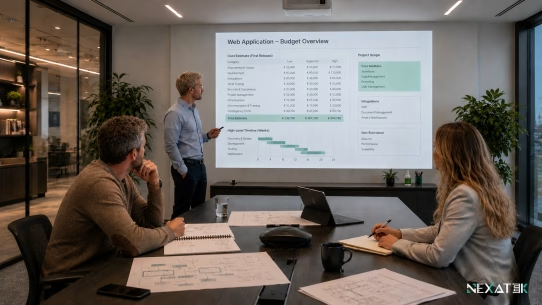


A useful reminder that the right construction software should fit the workflow, not force the workflow to fit the software.
A key point is that construction software should fit the actual workflow, not force teams to adapt to the tool. Mapping processes first can make a big difference in successful digitalization.